How to Add Google Reviews to Squarespace (The Easy Way)
If there’s one thing I’ll almost always recommend adding to a Squarespace website, it’s reviews, and preferably, Google Reviews.
Not testimonials you wrote yourself.
Not a perfectly curated quote from an email five years ago.
Real, public, searchable Google reviews.
If you’re trying to add Google reviews to Squarespace, this post will walk you through the simplest, least stressful way to do it, without overengineering your site or getting lost in tech.
Why Google Reviews Matter So Much on a Squarespace Website
People don’t trust businesses anymore just because they say they’re good.
They trust them because other people say they’re good.
Google dominates the online review space, and for many businesses, Google reviews are the first thing potential customers see, sometimes before they even land on your website.
When those same reviews show up on your Squarespace site, a few important things happen:
Visitors trust you faster
They stay on your site longer
They’re more likely to contact you, book, or buy
That’s the power of social proof.
Why I Recommend Elfsight for Adding Google Reviews to Squarespace
There are a lot of tools out there, but when clients ask how to add Google reviews to Squarespace, I almost always point them to Elfsight.
Here’s why.
It works cleanly with Squarespace
There’s a free option to get started
Paid plans are affordable and save a ton of time
Reviews auto-update (huge win)
Customization options are actually good
Yes, you can manually copy and paste reviews into your site. That works. And sometimes it’s the right move.
But if you want:
Reviews that stay fresh
No manual updating
More design control
Using Elfsight is worth it.
Before You Start: A Quick Note on Permissions
Even though Google reviews are public, I always recommend getting permission before copying and pasting a client’s review manually.
Most clients won’t mind at all, and they are happy to support you in this way.
If you use Elfsight and pull reviews directly from Google, you’re generally fine, but it’s still good practice to be thoughtful about how you display them.
Step-by-Step Tutorial: Add Google Reviews to Squarespace Using Elfsight
Let’s get into the how-to.

Step 1: Create an Elfsight Account
Go to elfsight.com and create an account.
You can start on the free plan and upgrade later if needed.
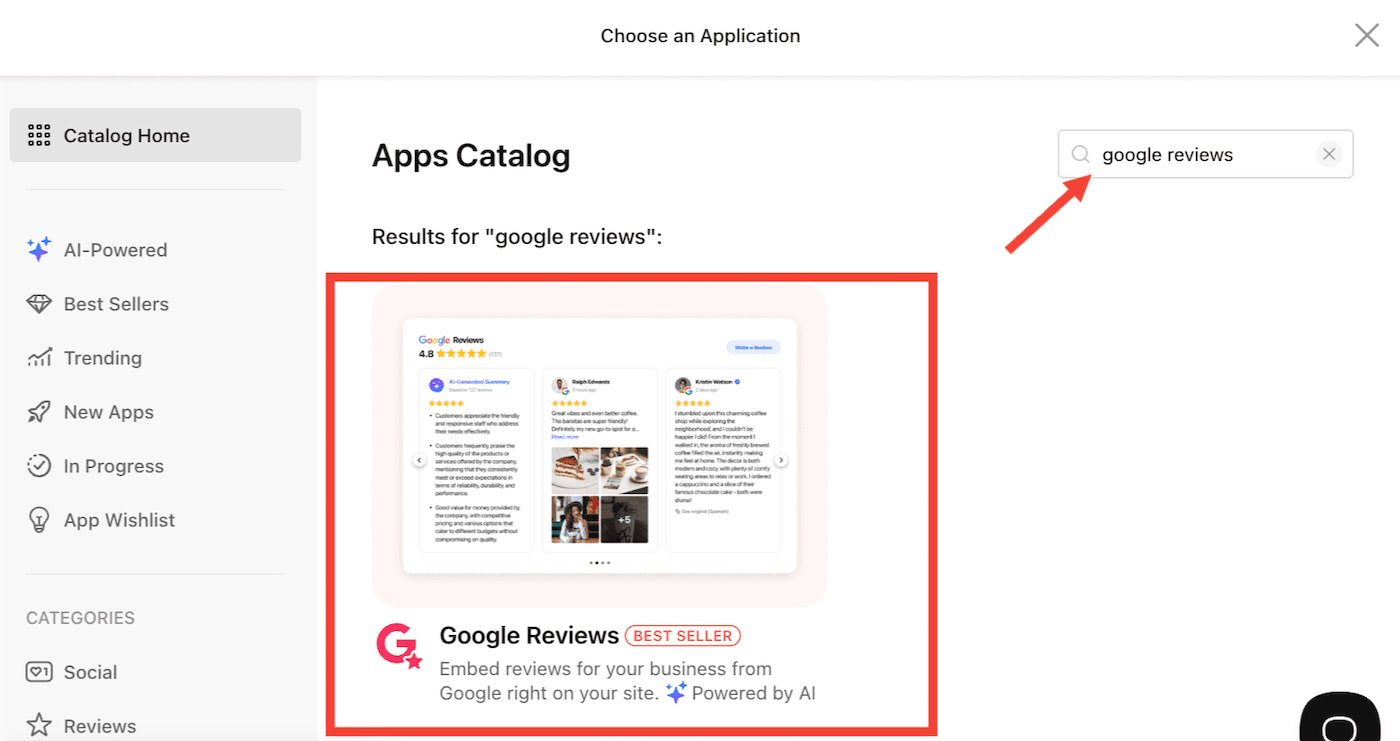
Step 2: Choose the Google Reviews Widget
From the Elfsight dashboard:
Select Google Reviews
Click on the widget to create it
This widget connects directly to your Google Business Profile.
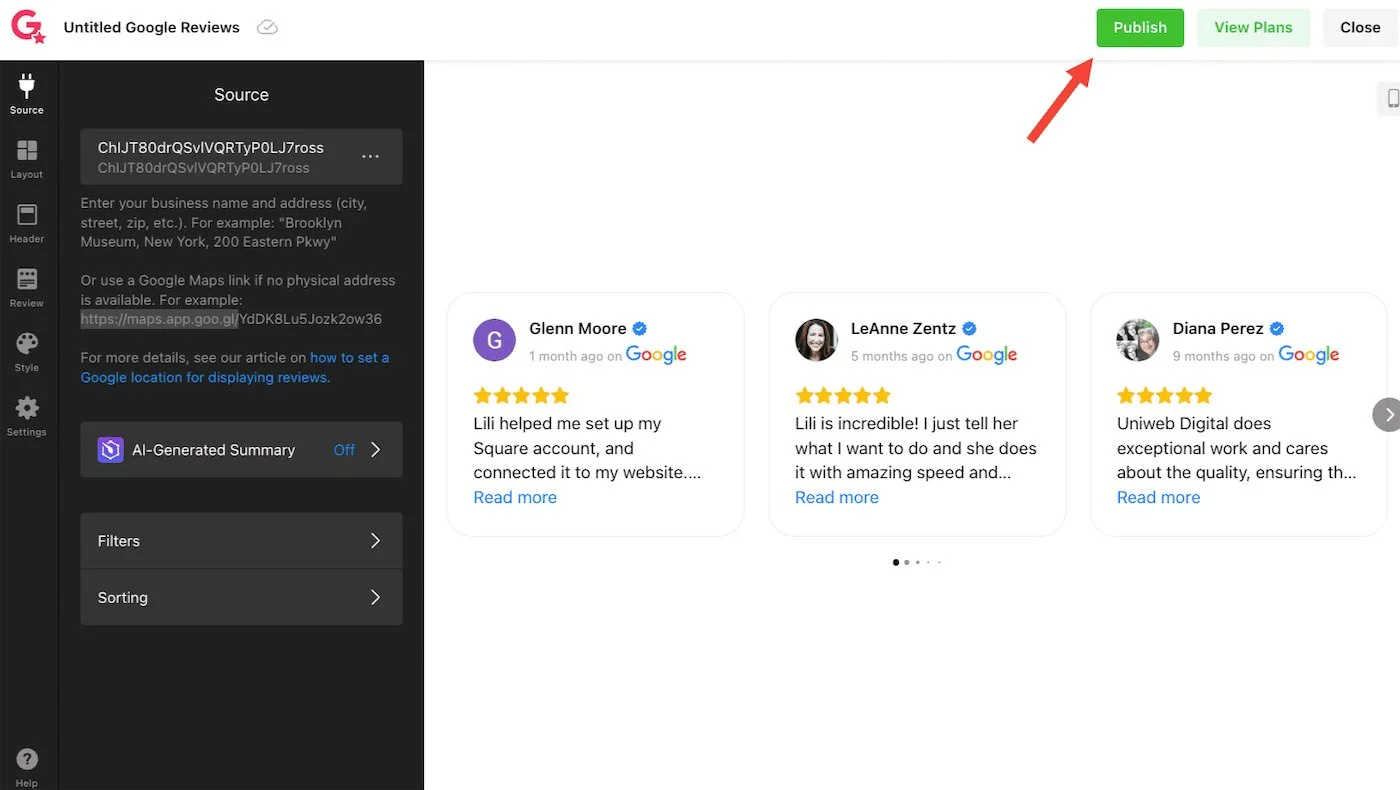
Step 3: Connect Your Google Business Profile
You’ll be prompted to:
Search for your business name
Or paste your Google Place ID (or your Google Maps Link, go to maps.google.com, look up your business, then select the share icon to get your url link to share)
Once connected, Elfsight will pull in your live Google reviews automatically.
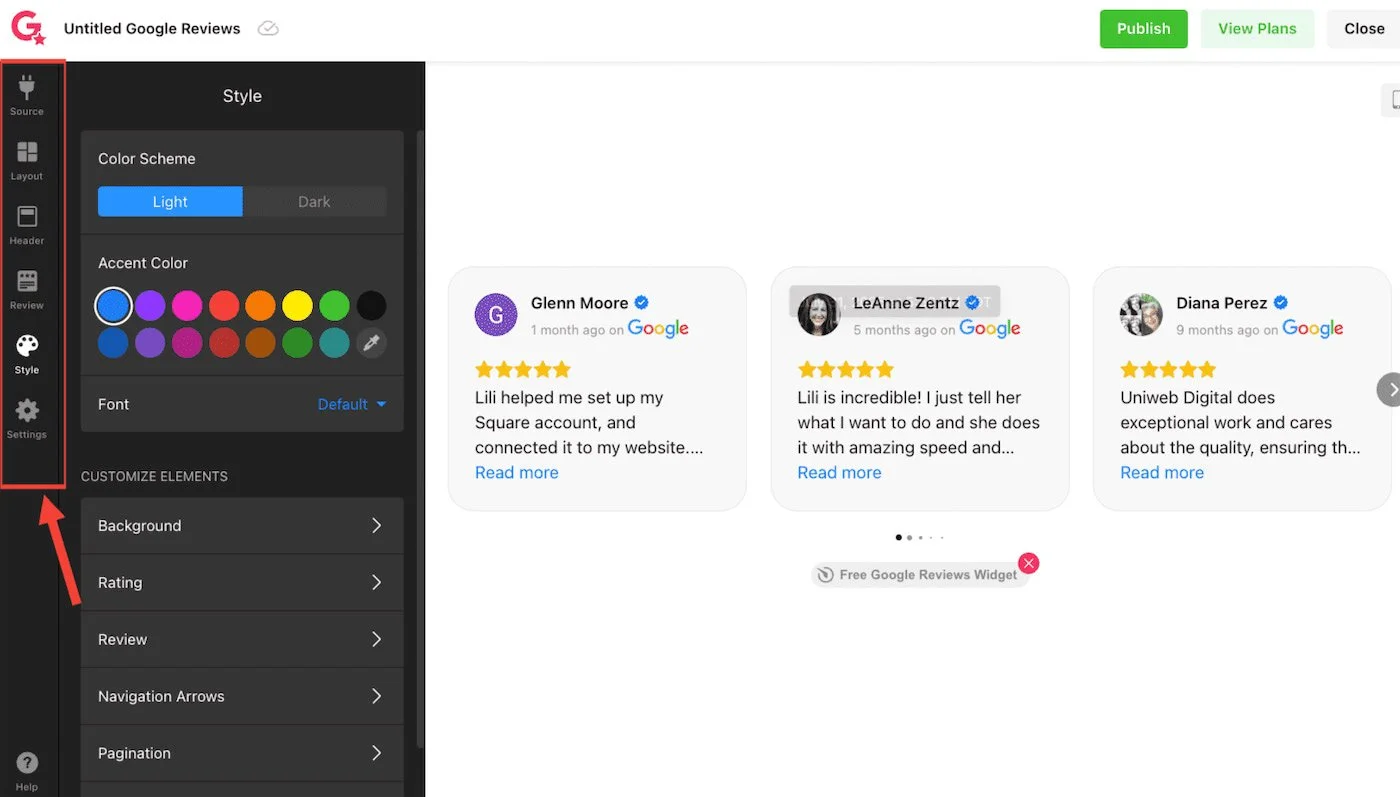
Step 4: Customize the Look (This Is the Fun Part)
Elfsight gives you a lot of control here. You can customize:
Layout (carousel, grid, list, slider)
Number of reviews shown
Star rating style
Fonts and colors
Review filtering (only 4–5 star reviews if you want)
This is where you make sure the widget actually looks like it belongs on your Squarespace site. I prefer keeping it simple.
Once you’re done click on “Publish”
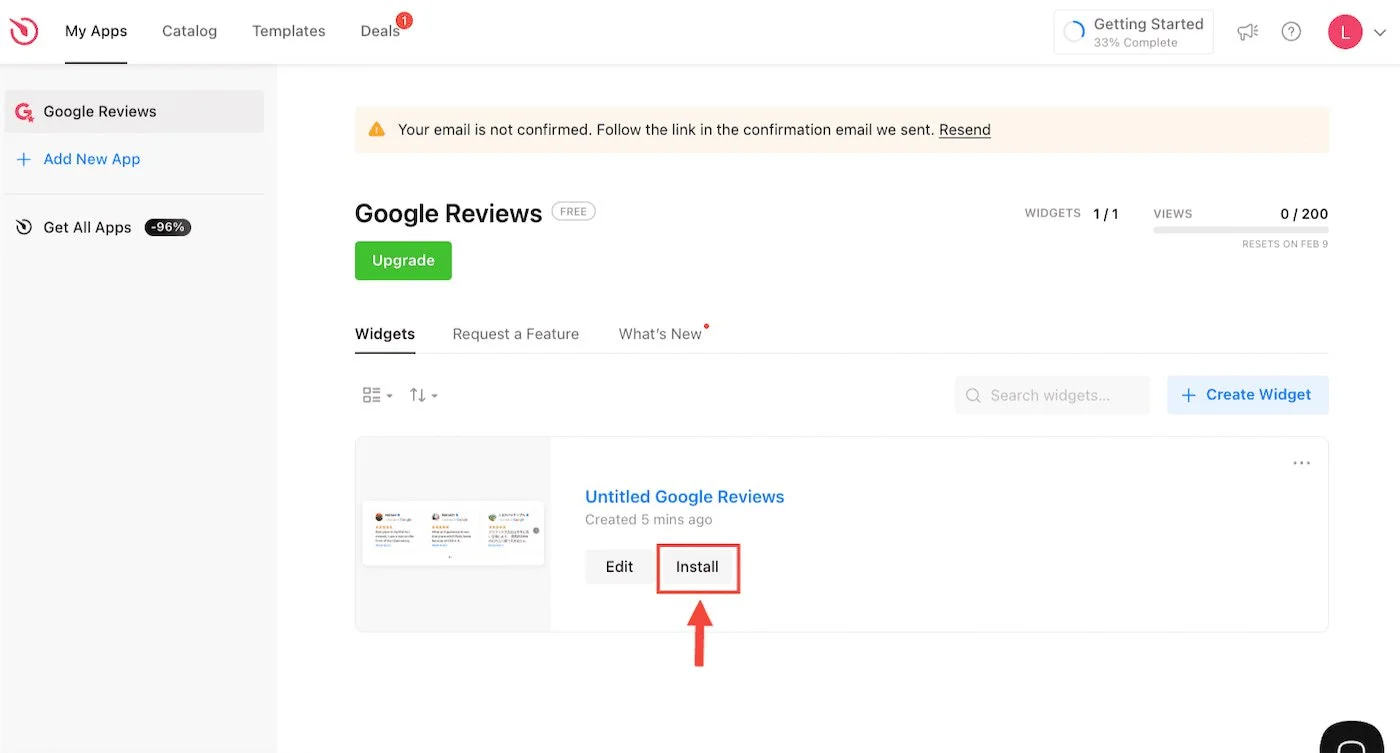
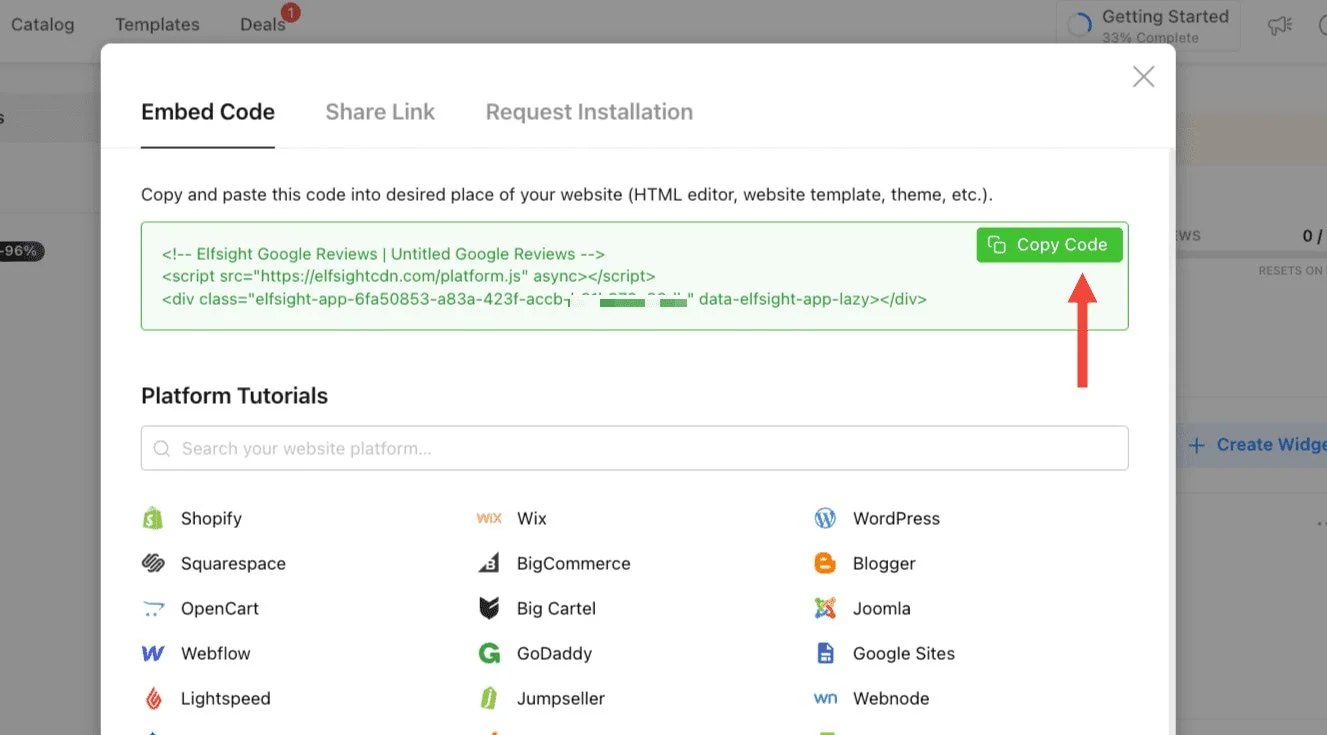
Step 5: Generate the Embed Code
Once you’re happy with the design:
Close the Widget Editor
Click Install
Copy the embed code Elfsight provides
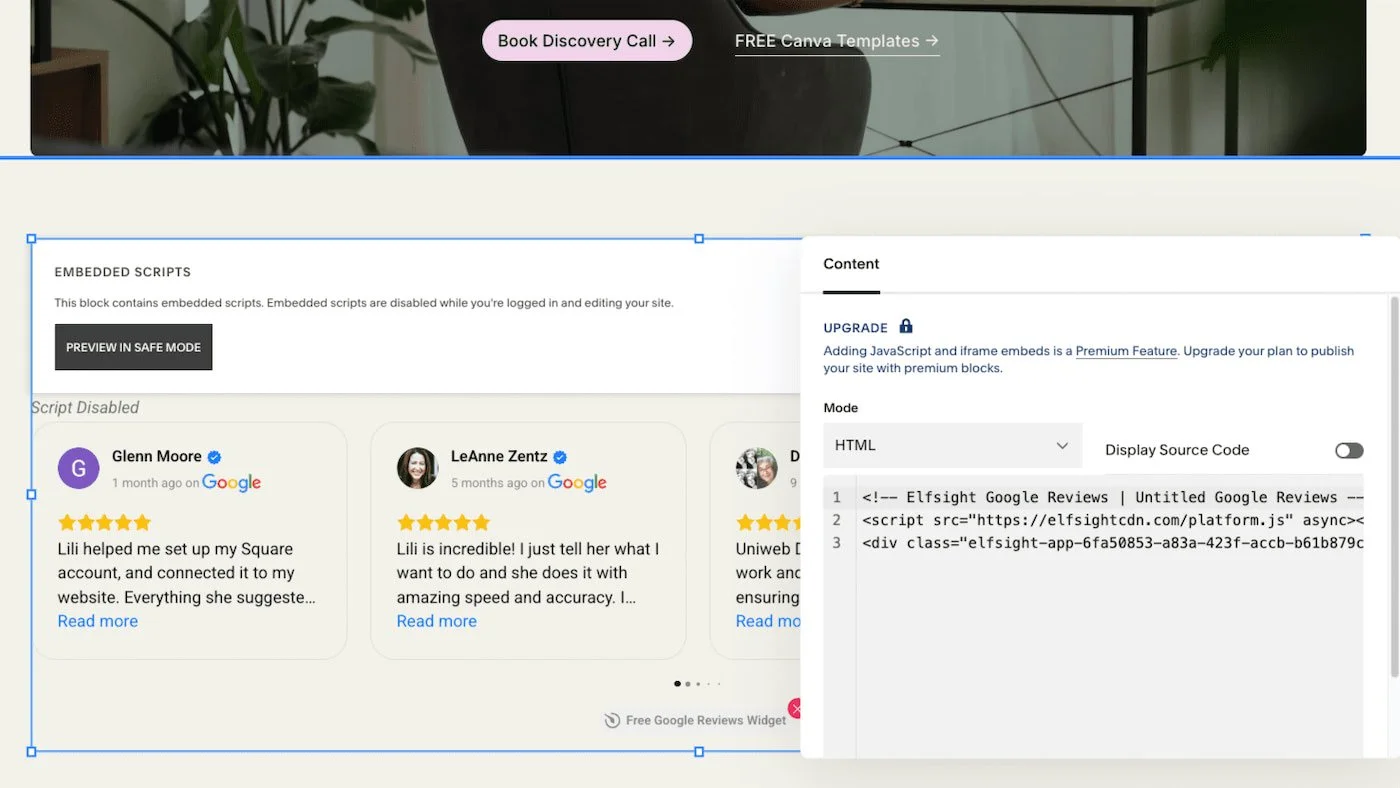
Step 6: Add the Reviews to Squarespace
In Squarespace:
Open the page where you want reviews to appear
Add a Code Block
Paste the Elfsight embed code
Save and preview
That’s it. Your Google reviews are now live on your Squarespace website.
Where Google Reviews Work Best on a Squarespace Site
If you’re not sure where to place them, start here:
Homepage (near services or CTA)
Services page
Contact page
Booking or inquiry page
The goal is reassurance. Reviews should show up right before someone is about to make a decision.
Free vs Paid Elfsight Plans (My Honest Take)
Yes, Elfsight has a free option.
It’s great for testing or smaller sites with not very much traffic.
That said, if you’re a local service provider such as a roofer, landscaper, etc. I usually tell clients to just go for a paid plan.
Why?
Less branding
More customization
More control
Less time spent troubleshooting
You can always downgrade later. But most people don’t.
Manual Reviews vs Auto-Updating Reviews
Let’s be real. Both are valid.
Manual copy and paste
Good for static testimonials
No tools required
Needs updating by hand
Elfsight auto-updating reviews
Always current
Builds more trust over time
One-time setup
If you want reviews that evolve with your business, auto-updating wins.
Final Thoughts: Adding Google Reviews to Squarespace Is Worth It
Learning how to add Google reviews to Squarespace is one of the highest-impact improvements you can make to your site.
It builds trust.
It supports conversions.
And it helps your website do its job better.
You don’t need to overcomplicate it.
Use a tool like Elfsight, customize it to match your brand, and place your reviews where they matter most.